[AWS 무료 서버구축-6/18] AWS free tier 서버 Linux 설정


AWS free tier 서버 Linux 설정
구축한 aws + ubuntu 18.0.4 서버 초기 설정을 진행 하겠습니다. 필요없다고 생각하는 부분은 skip 하셔도 상관 없습니다.
버전정보 확인
lsb_release - a 명령어를 입력하여 버전 정보를 확인 합니다.
ubuntu@ip-172-31-47-167:~$ lsb_release -a
No LSB modules are available.
Distributor ID:	Ubuntu
Description:	Ubuntu 18.04.5 LTS
Release:	18.04
Codename:	bionic
nopasswd 설정
nopasswd 설정을 진행하겠습니다.
sudo 해서 root 하는 일을 많이 진행할 예정입니다. 그때 마다 패스워드를 입력하지 않기 위해 /etc/sudoers 파일을 수정합니다
ubuntu@ip-172-31-47-167:~$ sudo vi /etc/sudoers%sudo ALL=(ALL:ALL) ALL 이라고 된부분을 아래와 같이 %sudo ALL=(ALL:ALL) NOPASSWD:ALL 로 수정 합니다.
#
# This file MUST be edited with the 'visudo' command as root.
#
# Please consider adding local content in /etc/sudoers.d/ instead of
# directly modifying this file.
#
# See the man page for details on how to write a sudoers file.
#
Defaults        env_reset
Defaults        mail_badpass
Defaults        secure_path="/usr/local/sbin:/usr/local/bin:/usr/sbin:/usr/bin:/sbin:/bin:/snap/bin"

# Host alias specification

# User alias specification

# Cmnd alias specification

# User privilege specification
root    ALL=(ALL:ALL) ALL

# Members of the admin group may gain root privileges
%admin ALL=(ALL) ALL

# Allow members of group sudo to execute any command
%sudo   ALL=(ALL:ALL) NOPASSWD:ALL

# See sudoers(5) for more information on "#include" directives:

#includedir /etc/sudoers.d
패키지 업데이트
최신 패키지로 변경하기 위해 아래와 같이 update upgrade 를 진행합니다.
ubuntu@ip-172-31-47-167:~$ sudo apt updateubuntu@ip-172-31-47-167:~$ sudo apt upgrade -y타임존 변경
타임존을 변경합니다.
기본 설치하고 나면 timezone이 utc로 설정 되어 있습니다. timezone을 KST로 변경합니다.
ubuntu@ip-172-31-47-167:~$ sudo timedatectl set-timezone 'Asia/Seoul'date 명령을 입력하여 정상적으로 변경되었는지 확인 합니다.
ubuntu@ip-172-31-47-167:~$ date
Wed Mar  3 23:52:20 KST 2021
호스트명 변경
homename을 변경합니다.
호스트 이름을 바꾸지 않아 아래와 ip-172-31-47-167 나옵니다 아래 명령어를 입력하여 호스트 이름을 goodsaem으로 변경합니다.
ubuntu@ip-172-31-47-167:~$ sudo hostnamectl set-hostname goodsaem정상적으로 변경되었는지 확인 합니다.
ubuntu@ip-172-31-47-167:~$ cat /etc/hostname
goodsaem
서버를 재시작 하면 호스트 이름이 변경되므로 변경되지 않도록 설정을 수정합니다.
ubuntu@ip-172-31-47-167:~$ sudo vi /etc/cloud/cloud.cfg아래 내용중 preserve_hostname: false 되어 있는 부분을 true로 변경합니다.
# The top level settings are used as module
# and system configuration.

# A set of users which may be applied and/or used by various modules
# when a 'default' entry is found it will reference the 'default_user'
# from the distro configuration specified below
users:
   - default

# If this is set, 'root' will not be able to ssh in and they
# will get a message to login instead as the default $user
disable_root: true

# This will cause the set+update hostname module to not operate (if true)
preserve_hostname: true

# Example datasource config
# datasource:
#    Ec2:
#      metadata_urls: [ 'blah.com' ]
#      timeout: 5 # (defaults to 50 seconds)
#      max_wait: 10 # (defaults to 120 seconds)


# The modules that run in the 'init' stage
cloud_init_modules:
 - migrator
 - seed_random
 - bootcmd
 - write-files
 - growpart
 - resizefs
 - disk_setup
 - mounts
 - set_hostname
 - update_hostname
 - update_etc_hosts
 - ca-certs
 - rsyslog
 - users-groups
 - ssh

# The modules that run in the 'config' stage
cloud_config_modules:
# Emit the cloud config ready event
# this can be used by upstart jobs for 'start on cloud-config'.
 - emit_upstart
 - snap
 - ssh-import-id
 - locale
 - set-passwords
 - grub-dpkg
 - apt-pipelining
 - apt-configure
 - ubuntu-advantage
 - ntp
 - timezone
 - disable-ec2-metadata
 - runcmd
 - byobu

# The modules that run in the 'final' stage
cloud_final_modules:
 - package-update-upgrade-install
 - fan
 - landscape
 - lxd
 - ubuntu-drivers
 - puppet
 - chef
 - mcollective
 - salt-minion
 - reset_rmc
 - refresh_rmc_and_interface
 - rightscale_userdata
 - scripts-vendor
 - scripts-per-once
 - scripts-per-boot
 - scripts-per-instance
 - scripts-user
 - ssh-authkey-fingerprints
 - keys-to-console
 - phone-home
 - final-message
 - power-state-change

# System and/or distro specific settings
# (not accessible to handlers/transforms)
system_info:
   # This will affect which distro class gets used
   distro: ubuntu
   # Default user name + that default users groups (if added/used)
   default_user:
     name: ubuntu
     lock_passwd: True
     gecos: Ubuntu
     groups: [adm, audio, cdrom, dialout, dip, floppy, lxd, netdev, plugdev, sudo, video]
     sudo: ["ALL=(ALL) NOPASSWD:ALL"]
     shell: /bin/bash
   # Automatically discover the best ntp_client
   ntp_client: auto
   # Other config here will be given to the distro class and/or path classes
   paths:
      cloud_dir: /var/lib/cloud/
      templates_dir: /etc/cloud/templates/
      upstart_dir: /etc/init/
   package_mirrors:
     - arches: [i386, amd64]
       failsafe:
         primary: http://archive.ubuntu.com/ubuntu
         security: http://security.ubuntu.com/ubuntu
       search:
         primary:
           - http://%(ec2_region)s.ec2.archive.ubuntu.com/ubuntu/
           - http://%(availability_zone)s.clouds.archive.ubuntu.com/ubuntu/
           - http://%(region)s.clouds.archive.ubuntu.com/ubuntu/
         security: []
     - arches: [arm64, armel, armhf]
       failsafe:
         primary: http://ports.ubuntu.com/ubuntu-ports
         security: http://ports.ubuntu.com/ubuntu-ports
       search:
         primary:
           - http://%(ec2_region)s.ec2.ports.ubuntu.com/ubuntu-ports/
           - http://%(availability_zone)s.clouds.ports.ubuntu.com/ubuntu-ports/
           - http://%(region)s.clouds.ports.ubuntu.com/ubuntu-ports/
         security: []
     - arches: [default]
       failsafe:
         primary: http://ports.ubuntu.com/ubuntu-ports
         security: http://ports.ubuntu.com/ubuntu-ports
   ssh_svcname: ssh
다시 로그아웃 하고 로그인 했을때 hostname 이 변경되었는지 확인 합니다. goodsaem으로 정상 변경되었습니다.
ubuntu@ip-172-31-47-167:~$ logout
Connection to ec2-13-209-42-88.ap-northeast-2.compute.amazonaws.com closed.
goodsaem@goodsaemui-iMac goodsaem % ssh -i "goodsaem.pem" ubuntu@ec2-13-209-42-88.ap-northeast-2.compute.amazonaws.com
Welcome to Ubuntu 18.04.5 LTS (GNU/Linux 5.4.0-1037-aws x86_64)

 * Documentation:  https://help.ubuntu.com
 * Management:     https://landscape.canonical.com
 * Support:        https://ubuntu.com/advantage

  System information as of Thu Mar  4 00:00:55 KST 2021

  System load:  0.0               Processes:           121
  Usage of /:   8.3% of 29.02GB   Users logged in:     1
  Memory usage: 39%               IP address for eth0: 172.31.47.167
  Swap usage:   0%

 * Introducing self-healing high availability clusters in MicroK8s.
   Simple, hardened, Kubernetes for production, from RaspberryPi to DC.

     https://microk8s.io/high-availability

 * Canonical Livepatch is available for installation.
   - Reduce system reboots and improve kernel security. Activate at:
     https://ubuntu.com/livepatch

18 packages can be updated.
0 of these updates are security updates.
To see these additional updates run: apt list --upgradable

New release '20.04.2 LTS' available.
Run 'do-release-upgrade' to upgrade to it.


*** System restart required ***
Last login: Wed Mar  3 23:13:55 2021 from 1.247.71.18
ubuntu@goodsaem:~$
/etc/hosts 아이피 변경
/etc/hosts 에 있는 아이피를 변경합니다.
아이피와 호스트 정보를 입력해 주세요 전 127.0.0.1 과 aws 부여해준 공인 아이피(이아이피는 서버를 재시작 하면 다른 아이피로 변경됩니다.)를 입력했습니다. 전 가급적이면 서버를 재시작 하지 않을 계획이므로 그대로 사용하겠습니다.
ubuntu@goodsaem:~$ sudo vi /etc/hosts
127.0.0.1 localhost
127.0.0.1 goodsaem
13.124.172.200 goodsaem.ml
13.124.172.200 www.goodsaem.ml

# The following lines are desirable for IPv6 capable hosts
::1 ip6-localhost ip6-loopback
fe00::0 ip6-localnet
ff00::0 ip6-mcastprefix
ff02::1 ip6-allnodes
ff02::2 ip6-allrouters
ff02::3 ip6-allhosts
무료도메인내 ip 변경
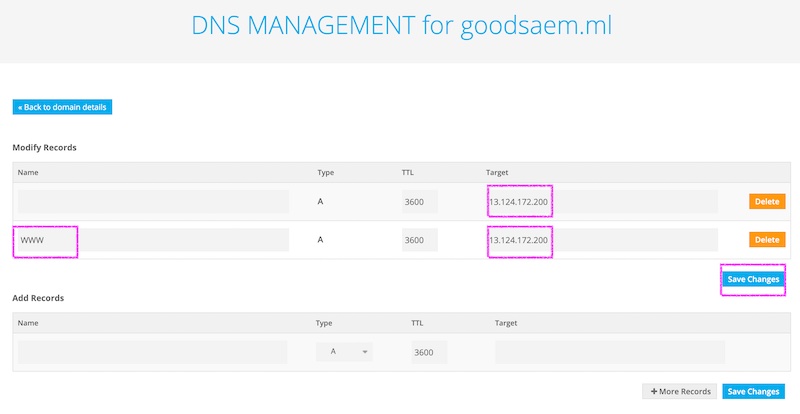
freenom 무료 도메인을 발급 받은곳의 아이피를 aws ec2 서버 아이피로 변경합니다.
로그인후 service > my domains 를 클릭합니다.

Manage domain 버튼을 클릭합니다.

Manage Freenom DNS 를 클릭합니다.

ec2 서버의 아이피를 입력하고 save change 버튼을 클릭하여 변경사항을 적용 합니다.
'Setup > aws' 카테고리의 다른 글
| [AWS 무료 서버구축-9/18] Maria DB 데이터 베이스 생성 (0) | 2021.07.25 |
|---|---|
| [AWS 무료 서버구축-8/18] Maria DB 설치 (0) | 2021.07.25 |
| [AWS 무료 서버구축-5/18] AWS free tier 서버 접속(mac, windows) (0) | 2021.07.25 |
| [AWS 무료 서버구축-4/18] AWS 에 EC2 인스턴스 추가 (0) | 2021.07.25 |
| [AWS 무료 서버구축-3/18] AWS 계정생성 (0) | 2021.07.25 |